Microsoft may finally be ready to admit what many users have been saying for years: Windows 11 still needs work. Reports from multiple sources reveal that the company is now pursuing an internal initiative called Windows K2, a long-term project focused on improving performance, reliability, design consistency, and user trust. Rather than launching Windows 12 immediately, Microsoft appears to be concentrating on repairing the current platform first.
For millions of PC users, this could be one of the most important Windows stories of 2026.

What is Windows K2?
Windows K2 is reportedly an internal codename for a major quality-improvement strategy inside Microsoft. It is not a new operating system, and it is not a single downloadable update. Instead, K2 is said to be a company-wide effort to overhaul how Windows 11 is developed and maintained.
The codename “K2” likely refers to the world’s second-highest mountain, symbolizing a difficult challenge. That challenge is clear: restore confidence in Windows after years of criticism involving bugs, inconsistent design, slow performance, forced features, and unpopular interface decisions.
According to reports, Microsoft wants Windows 11 to become faster, cleaner, and more dependable over the next two years.
Why Microsoft needs K2
Windows remains one of Microsoft’s most important products, but Windows 11 has struggled to achieve the enthusiasm that earlier versions like Windows 10 enjoyed.
Some common complaints from users include:
- Sluggish File Explorer performance
- Slow or cluttered Start menu behavior
- Inconsistent interface design across apps
- Too many background services and resource use
- Frequent update frustrations
- Heavy promotion of AI tools like Copilot
- Advertising and recommendations in system areas
- Missing customization features that existed in Windows 10
These frustrations have pushed some users to stay on Windows 10 longer, while others have experimented with Linux or macOS alternatives.
K2 appears to be Microsoft’s answer.
The four main pillars of Windows K2
Reports suggest the project is built around four key goals:
1. Performance
Microsoft reportedly wants Windows 11 to feel noticeably faster in everyday use. That includes quicker Start menu responses, smoother File Explorer navigation, lower memory usage, and better responsiveness on mid-range hardware.
This matters because many users complain that even modern PCs sometimes feel slower on Windows 11 than they did on Windows 10.
2. Craft
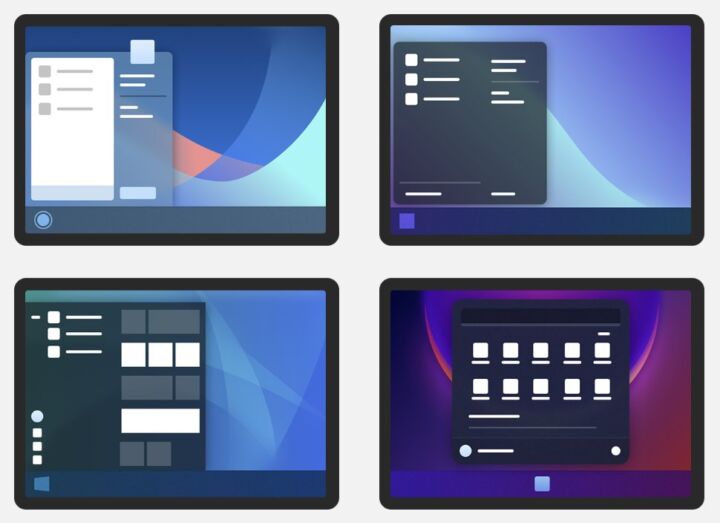
This pillar focuses on polish and consistency. Windows 11 currently mixes modern design with legacy menus and old control panels. K2 may aim to reduce that fragmentation and create a more unified interface.
That could mean cleaner visuals, smoother animations, and fewer mismatched windows.
3. Reliability
Microsoft reportedly wants fewer crashes, fewer broken updates, and fewer forced restarts. Updates may become smaller, safer, and less disruptive. Maybe we will have no reason to delay them, now that we can postpone Windows 11 updates for life.
For businesses and home users alike, reliability may be the most important improvement.
4. Community
Microsoft also appears to want better engagement with users through feedback channels, Insider testing, and clearer communication.
In recent years, many users felt Microsoft was adding features nobody requested while ignoring long-standing complaints. K2 could signal a shift toward listening again.
What changes could users actually see?
While Microsoft has not officially announced K2 publicly as a product, reports suggest users may gradually notice changes through monthly and yearly updates.
Likely improvements include:
- Faster Start Menu – The Start menu has often been criticized for being slow, cluttered, or limited. K2 may bring a redesigned version that opens faster and offers better customization.
- Better File Explorer – File Explorer remains one of the most-used Windows apps. Performance improvements here would benefit nearly every user.
- Reduced Bloat – Many users want fewer preinstalled apps, fewer promotions, and fewer unwanted recommendations. Reports suggest Microsoft is aware of this criticism.
- Smarter Updates – Instead of disruptive restarts and problematic patches, updates could become more stable and less intrusive.
- Gaming Improvements – Some reports mention better optimization to help Windows compete with alternatives like SteamOS for gaming performance.
Does this mean Windows 12 is delayed?
Possibly.
For years, rumors have suggested Microsoft would launch Windows 12 soon. But if K2 is real and substantial, it may indicate Microsoft believes fixing Windows 11 is more urgent than releasing a new name.
That would be a logical move. Launching Windows 12 without solving current frustrations could simply repeat the same problems.
Instead, Microsoft may prefer to rebuild trust first, then decide later whether a rebranded future version makes sense.
How it will affect regular users
If you use Windows 11 this is good news. You may receive steady improvements without needing to buy a new PC or reinstall a new operating system.
Performance boosts, cleaner design, and more stable updates could arrive gradually.
If you still use Windows 10, Windows K2 may give you a reason to eventually upgrade – especially if Microsoft solves the responsiveness and usability issues many Windows 10 users dislike about Windows 11.
If you use older hardware if optimization becomes a priority, mid-range and older supported PCs could benefit significantly.
If you use Windows for work businesses care deeply about stability. Better updates and fewer disruptions would be welcomed by IT departments worldwide.
Why this matters more than AI features
Over the last two years, Microsoft heavily promoted AI integration across Windows. But many users simply wanted the basics fixed first.
A fast Start menu, reliable updates, efficient battery life, and responsive file browsing often matter more than AI assistants.
Windows K2 suggests Microsoft may finally understand that core quality matters more than flashy features.
Should users be excited yet?
Cautiously, yes.
It is important to remember that K2 is currently based on credible reporting rather than a formal Microsoft product launch. Plans can change, timelines can slip, and not every rumored improvement may happen.
However, the most encouraging part is the mindset shift: Microsoft reportedly recognizes Windows 11 needs refinement, not just more features.
That alone is significant.
Our take
Windows K2 could become the most important Windows initiative in years – not because it introduces something radical, but because it focuses on fundamentals.
Users do not necessarily need a futuristic Windows 12. They need a version of Windows that is fast, stable, consistent, and pleasant to use every day. Here’s what we want to see, maybe you relate.
If Microsoft truly commits to that vision, Windows K2 may be exactly what the platform needs.
Frequently Asked Questions about Windows K2
Windows K2 is reportedly an internal Microsoft project focused on improving Windows 11 performance, reliability, design consistency, and overall user experience.
No, Windows K2 is not expected to be a separate operating system like Windows 12. It appears to be a plan to improve Windows 11 through future updates.
Windows K2 is expected to focus on faster performance, fewer bugs, better updates, cleaner design, and improved responsiveness.
There is no official release date. Improvements linked to Windows K2 may appear gradually in upcoming Windows 11 updates.